
Like pretty much all the MotoGP games, MotoGP 21 has a tricky handling model that might feel awkward to get used to at first. I’ve actually gone back to this game having played MotoGP 23 and ’22 first, and I did find ’21 tricky.
But the good news is that if you get the right controller calibration settings and slap on a good stable setup, the game is totally easy to get used to quickly. Once I got both of these things sorted, I was quickly up to speed on this game and preferring it massively to both the ’23 and ’22 games (I haven’t tried the ’24 game yet).
Regarding the controller calibration settings, there’s a few simple tweaks you can make for easier overall handling (especially traction and braking).
Here’s a summary of the changes that worked for me:
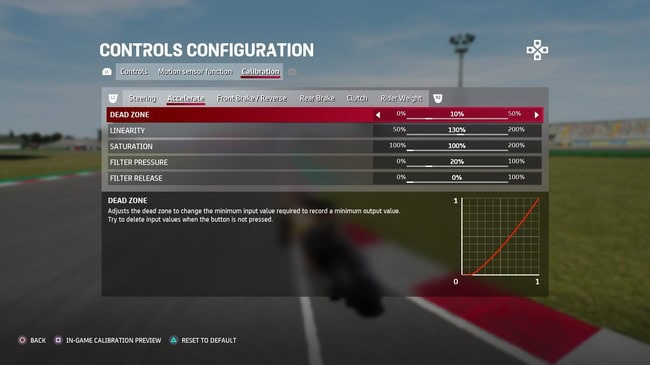
- Set throttle Dead-zone at 10%
- Set throttle Linearity at 130%
- Set throttle Filter Pressure at 20%
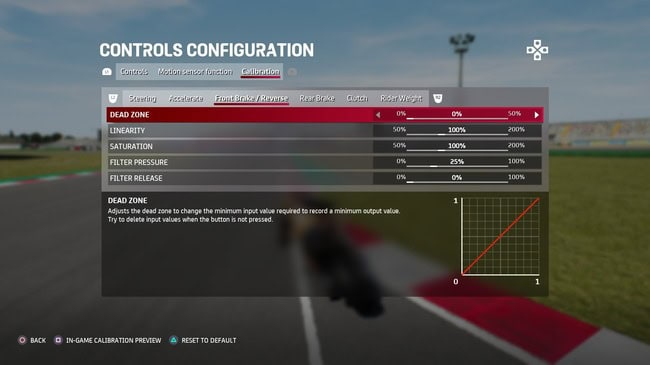
- Set front brake Filter Pressures at 25%
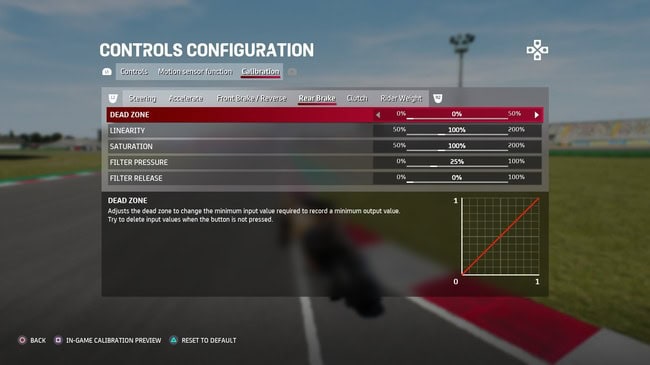
- Set rear brake Filter Pressure at 25%
- Leave all other calibration settings as they are.
Acceleration settings:
Front Brake Settings:
Rear Brake Settings:
So it’s basically just these 5 tweaks and leave all other calibration settings as you find them. This made the handling and consistency for me at least a lot easier, as well as banging on a nice stable setup, which I’ve got another post on.
These Changes Explained
Let’s explain the rationale behind these calibration tweaks in a little more detail.
Throttle Dead-zone (10%) – This setting determines how much you can move the throttle trigger without it registering any input. You generally want this to be low, so you get immediate response, but I find adding a very small dead-zone just softens the initial input of the accelerator, making traction a bit easier.
Throttle Linearity (130%) – A crucial settings change for me for easier traction and corner exits. This controls how the input translates to output. A linear setting means that your input directly corresponds to output. Doing the tutorials in the game, I was finding that using the default calibration of 100%, I was constantly losing traction and crashing when trying to gradually apply the throttle coming out of prolonged corners with the bike still partially leaning (eg. coming out of all the longer corners at Catalunya). Moving this up to 130% stopped this happening and allowed for easier traction on prolonged corner exits.
Throttle Filter Pressure (20%) – Another small tweak that just makes the application of the power a bit easier. Moving this setting up from the default of 0% to 20% just smooths or cuts out the first initial input of the throttle, again preventing loss of traction on corner exit. Acts as kind of extra traction control to make it easier to be consistent on corner exits. Experiment with anything from 10% – 40% for this setting; 20% worked great for me.
Front brake Filter Pressure (25%) – Same idea as with the throttle FP, moving this up a bit from 0% just cuts out the first input a bit to prevent “stoppies” under braking and allow for a more aggressive first application of the front brake without it de-stabilizing the bike so much.
Rear brake Filter Pressure (25%) – Same idea again, and I found this helped smooth out the quite sensitive rear brake on the ’21 game. Using the default setting, I was finding the bike wobbling quite a bit when applying the rear brake during prolonged corners to get the bike tucked into the apex. Adding some FP just smoothed this out a bit and allowed for easier cornering by just tapping or dabbing the rear brake to keep the bike on the correct line in longer corners.
Some General Handling Tips
The braking and cornering on all these MotoGP games is hard at first if you’re not used to it. But on the spectrum of all the games, GP 21 is one of the easier ones once you get the exact technique down, plus some good calibration settings like above to make the handling smoother.
Here’s some extra tips for controlling the bike consistently:
- In general for braking, aim to get all your braking done in a straight line when the bike is upright. The general pattern is brake to scrub off all the speed in a straight line — release — lean bike into the corner.
- For harder braking zones after longer straights, a simple hack that makes it much easier is to first apply the rear brake on it’s own very hard but very briefly, THEN release and apply both the front and rear brake together hard again. Seems to get the bike stopped better in heavy braking zones (you’ll often find yourself over-running the corners after long straights at first).
- Turning the Joint Brakes setting on allows you to apply both the front and rear brakes together with one button to make it easier at first.
- If you’re totally new to these games, the braking and turn in points are MUCH sooner than for 4 wheel racing cars. So it’s a different muscle memory you need to learn and get used to.
- In general, always err on the side of braking too early rather than too late for this game, especially when you’re still getting used to the game. It’s a good idea to brake even before the racing line tells you to on longer straights, and even lift off the power and coast into harder braking zones briefly to give yourself more wriggle room.
- The rear brake can be used on it’s own during cornering to help tuck the bike in, but only dab/tap it very lightly and briefly as too much input unsettles the bike. Applying the Filter Pressure calibration tweak I gave above also helps smooth out this input and keep the bike stable during cornering.
See my separate guide on full braking technique for the game, which goes over both the simpler braking after shorter straights and more advanced braking after long straights. Once you get used to it, it’s actually easier to be consistent on MotoGP 21 than on some successive games.