
F1 24 does have a tricky handling model that can take a while to get used to for pad users. The several patches in the first few months after the game release have made it easier, but it’s still useful to have some baseline setups to get used to the game.
And most of the setup resources I see online are designed by wheel users, and they don’t always translate well for pad users. For a start, these insane wing spread that many setups are using – like 30/20 wings or something – are no good for me at least. No way I can make them work on a pad, especially over a longer race as the tyres wear.
So I want to fill in this gap by suggesting some decent easy to control baseline setups for controller users for this game, for newer players to get started with and build up confidence with the handling.
Here’s a generic template setup for a controller user for F1 24:
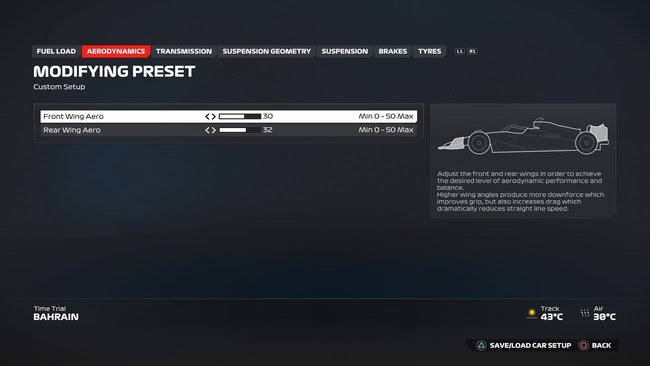
- Wings – adjust for each track, set rear wing 2 clicks higher than the front on all tracks as a baseline on a controller, and tweak from there.
- Diff – 10/50/50
- Camber – -3.50/-2.20/0.00/0.13 (LLL/0.13)
- Suspension – 39-5-15-9-25-58
- Brakes – 95% Pressure/53 Bias
- Tyre pressures – 26.0 fronts; 23.5 rears (middle pressures)
This is just a baseline to get going with, and it’s better to vary it by track once you get used to the game (individual track setups are linked below). But it’s a starting point, and I always set the rear wing 2 clicks above the front in the dry when using a pad and Medium TC, for better control and stability over a race.
You will need to adjust the wing levels for different circuit to stay competitive on this game, especially against the insanely over-powered AI on the straights and the very powerful ERS/DRS combo.
Whilst it’s only very general and it’s best to consult the individual track setups I’ve linked below, here are some suggested wing levels for different track types:
- Lowest downforce tracks (Monza, Las Vegas) – 5/8 wings (plus or minus 1-2 clicks)
- Low-Medium downforce tracks (Jeddah, Belgium, Baku, Miami) – 14/16 or 16/18 wings
- Medium downforce tracks (Bahrain, Australia, Japan, China, Imola, Canada, Austria, Britain, Mexico, Brazil, Abu Dhabi) – 22/24 to 26/28 wings.
- High downforce tracks – (Spain, Zandvoort, Portugal, Texas, Qatar) – 34/36 to 38/40 wings
- Maximum downforce tracks (Monaco, Hungary, Singapore) – 47/50 or 48/50 wings
Again, these are just very general suggestions that might not fit well for all tracks. Plus, on some tracks like Spa, you can go in different directions and use either very low wings or higher ones. Check out the individual setup links posted below for more precise configurations.
Tweaks You Can Make To The Template
This baseline setup is designed primarily for stability and ease of handling while you build up confidence on the game. If you want to make it more aggressive and potentially faster (but harder to control), here are some recommended tweaks you can make.
Wing Levels & Wing Spread – As with the last few games, you often need to use a lower wing level than you might expect just to fend off AI or human opponents on the straights. As for the wing spread, lots of players are setting the rear wing much lower than the front wing (as much as 10-15 clicks lower) for sharper turn in. As with the ’23 game, I can’t make this work on a pad as the tyres wear (it’s too unstable), so I invert this set the rear wing higher. But if you want to go more aggressive as you gain confidence, that’s the direction to go – set the rear wing lower than the front. For a start, I always set the rear wing 2 clicks higher than the front on a pad for stability.
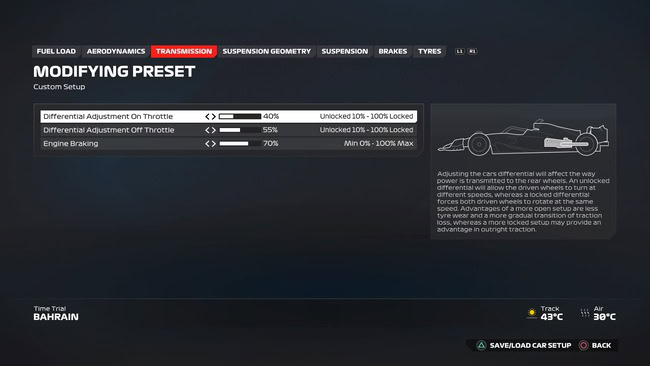
On Throttle Diff – I put this down to the minimum of 10 as a baseline for the easiest to control traction on a pad (I use Medium traction control). Increasing this value provides potentially stronger traction, but it’s harder to control and apply. You can raise to 20-25 on some tracks and it still feels fine on a pad, but I start with 10 and usually stay there, since the difference in lap time you can get by raising it seems minimal. On this game, I want traction and stability above all else, especially as the tyres start to wear in races, but increase if you want more potential pace
Off Throttle Diff – I keep this in the middle for a nice consistent feel, but if you want sharper turn in when cornering off the thottle, you can lower it in increments of 5. I sometimes lower it to 45 or even 40 on some tracks for stronger turn in, but keeping it in the middle at 50 I find is a good baseline for stability under rotation. Reduce for more aggressive setups.
Engine Braking – This is a new setting within the Differential tab for this game, and honestly, I haven’t played around with it that much and the various patches up to and including 1.7 have changed the handling quite a lot. But it seems that moving this higher up towards 100 is the more aggressive approach, but can also affect stability under braking. For now, I just keep it in the middle at 50 to get a similar kind of handling to the ’23 game, but you can try raising it in increments of 10 if you want.
Suspension – Generally raising the values is the more aggressive approach here, but is harder to control. I’ll cover each aspect of the geometry settings:
- Suspension – Raising the front and rear generally potentially faster but harder to control.
- Anti-roll bars – Again raising them to maximum (21/21) seems to be what top end wheel users do, but very hard to control on a pad. I keep them much lower for a more planted feel.
- Ride Height – Depends on track but lowering provides better downforce, but is more unstable over the kerbs. Need to raise this by 1-3 clicks in wet conditions, but otherwise generally varies by track.
Tyre Pressures – Most faster players are actually running maximum tyre pressures across the board, but I keep them in the middle to start with for better stability again, and often set them to minimum for qualifying for maximum tyre temps. Here’s the general tradeoff with pressures on this game:
- Higher pressures – Keeps the tyre temperatures down and provides the best high speed “pointyness” or responsiveness, as well as very slightly more straight line speed (but the effect is negligible).
- Lower pressures – Allows for higher tyre temperatures (but it’s not a massive effect), and provides better traction and stability and a more planted, stable feel, and improves grip in slow speed corners. High speed responsiveness is reduced, and you might be very slightly slower on the straights.
So test how the handling is for you for maximum, minimum and middle pressures and use whatever you like (the overall lap times don’t seem to be that different so it’s largely down to handling preference). But keeping them in the middle is my own baseline preference.
Qualifying – You can definitely bring the wings closer together and adjust differential settings for sharper responsiveness since you’re on fresh tyres and only have to control it for one lap. I’m also always setting pressures to minimum just for Quali laps to get maximum temps into the soft tyre.
Adjusting For Wet Conditions
And for wet conditions, this needs a few more adjustments, here are some guidelines:
INTERMEDIATE CONDITIONS:
Load a dry setup for a track and:
- Add 1-2 clicks on the wings
- Space the rear wing 3 clicks above the front for better stability
- Lower On Throttle Diff to 10
- Soften suspension 1-2 clicks
Sometimes, even just using your dry setup with the slight wing adjustments also works fine for in light rain inter conditions.
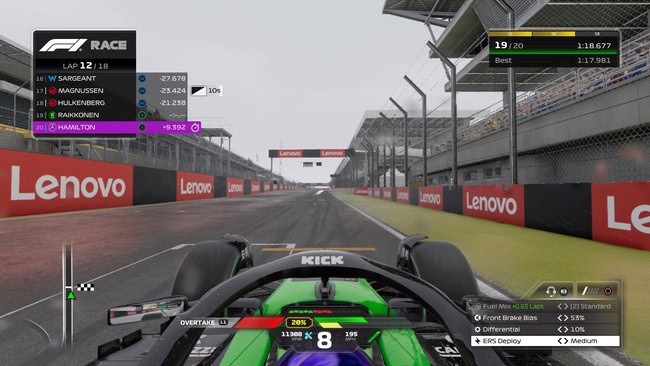
You’re just aiming to create a softer and more planted, stable feel to the car in the wet, and also easier traction.
And if you’re just looking for a generic full wet setup to save to your game files, here’s a suggested template:
- Wings – 27/30, adjust for each track.
- Diff – 10/55/55
- Camber – -3.50/-2.20/0.00/0.13 (LLL/0.13)
- Suspension – 38-4-14-8-28-61
- Brakes – 95% Pressure/53% Bias
- Tyre pressures – 26.0 fronts; maximum rears.
And if you’re just looking for a generic full wet setup to save to your game files, here’s a suggested template:
- Wings – 27/30, adjust for each track.
- Diff – 10/55/55
- Camber – -3.50/-2.20/0.00/0.13 (LLL/0.13)
- Suspension – 38-4-14-8-28-61
- Brakes – 95% Pressure/53% Bias
- Tyre pressures – 26.0 fronts; maximum rears.
Individual Race Setups For All F1 24 Circuits
Whilst using a template setup is great to get started with and gain confidence with the handling, it’s best to have a custom race setup for every circuit you race on.
These are definitely not blisteringly fast-over-one-lap setups, but are designed to be stable and easier to control over long runs for controller users. Again, you’ll have to adjust to your own preferences and style, but they’re something more specific to get started with.
Click on the links to view custom race setups (wet & dry) for pad users for all tracks in order:
- Bahrain
- Saudi Arabia
- Australia
- Japan
- China
- Miami
- Imola
- Monaco
- Canada
- Spain
- Austria
- Great Britain
- Hungary
- Belgium
- Zandvoort
- Monza
- Baku
- Singapore
- Texas
- Mexico
- Brazil
- Las Vegas
- Qatar
- Abu Dhabi
- Portugal
More F1 24 Setup Resources (All Tracks)
For pad users wanting more precision in car setups, and who test out and compare more custom car setup for all tracks, here are some resources to check out:
- Simracingsetups YouTube channel – Fantastic resource, and a great starting point for me now as a pad player. Always produces great usable baseline setups for all tracks, but I do have to tweak them significantly as his setups are created on a wheel and the wing and Diff levels especially don’t translate well over to a pad for me at least.
- F1laps.com – Another car setup forum with pages for every track, and loads of custom setups posted.
- F1gamesetup.com – An even more specialized resource with custom setups, every car and every track, wet and dry weather. Can also filter setups by car type and input device (wheel vs pad) for even more customization and precision.
FULL WET CONDITIONS:
Load a dry setup for the track and:
- Increase wings 3-5 clicks
- Space the rear wing 3 clicks above the front for better stability
- Increase ride height 3-5 clicks
- Soften suspension 2-3 clicks
- Lower the anti-roll bars 2-3 clicks.
- Reduce On Throttle Diff to 10
- Reduce Tyre Pressures 5-10 clicks
You’re just aiming to create a softer and more planted, stable feel to the car in the wet, and also easier traction.
And if you’re just looking for a generic full wet setup to save to your game files, here’s a suggested template:
- Wings – 27/30, adjust for each track.
- Diff – 10/55/55
- Camber – -3.50/-2.20/0.00/0.13 (LLL/0.13)
- Suspension – 38-4-14-8-28-61
- Brakes – 95% Pressure/53% Bias
- Tyre pressures – 26.0 fronts; maximum rears.
And if you’re just looking for a generic full wet setup to save to your game files, here’s a suggested template:
- Wings – 27/30, adjust for each track.
- Diff – 10/55/55
- Camber – -3.50/-2.20/0.00/0.13 (LLL/0.13)
- Suspension – 38-4-14-8-28-61
- Brakes – 95% Pressure/53% Bias
- Tyre pressures – 26.0 fronts; maximum rears.
Individual Race Setups For All F1 24 Circuits
Whilst using a template setup is great to get started with and gain confidence with the handling, it’s best to have a custom race setup for every circuit you race on.
These are definitely not blisteringly fast-over-one-lap setups, but are designed to be stable and easier to control over long runs for controller users. Again, you’ll have to adjust to your own preferences and style, but they’re something more specific to get started with.
Click on the links to view custom race setups (wet & dry) for pad users for all tracks in order:
- Bahrain
- Saudi Arabia
- Australia
- Japan
- China
- Miami
- Imola
- Monaco
- Canada
- Spain
- Austria
- Great Britain
- Hungary
- Belgium
- Zandvoort
- Monza
- Baku
- Singapore
- Texas
- Mexico
- Brazil
- Las Vegas
- Qatar
- Abu Dhabi
- Portugal
More F1 24 Setup Resources (All Tracks)
For pad users wanting more precision in car setups, and who test out and compare more custom car setup for all tracks, here are some resources to check out:
- Simracingsetups YouTube channel – Fantastic resource, and a great starting point for me now as a pad player. Always produces great usable baseline setups for all tracks, but I do have to tweak them significantly as his setups are created on a wheel and the wing and Diff levels especially don’t translate well over to a pad for me at least.
- F1laps.com – Another car setup forum with pages for every track, and loads of custom setups posted.
- F1gamesetup.com – An even more specialized resource with custom setups, every car and every track, wet and dry weather. Can also filter setups by car type and input device (wheel vs pad) for even more customization and precision.
Want to try the full F1 26 setup library?
F1 26 setups are now available via Track Titan — see our F1 26 setup guide for dry and wet race setups.
Track Titan now has dry and wet setup bundles available for F1 26, with Race and Quali Esports variations to be added automatically once ready.
View Track Titan F1 26 Setups →
Hello, great to have the new site up with F1 24 setups! I am wondering if you will be doing F2 setups for the new cars also. I remember there was an F2 page for last year. Thanks for your insights!
Hello! Glad you’re enjoying the setups. I never got round to using the F2 cars this year as switched over to MotoGP and having loads of fun on that, but if you’re wanting F2 setups, then check out Jafmasterflash 7 on YouTube. He’s your man for sure for F2 setups. Thanks for reminding me, I’ll post a link to his channel at the top of this article for readers looking specifically for F2 setups for F1 24.